

Thursday, 22 November 2012
Behind the Album: Creating a Website Header for our Artist
In order to give our fans a place to not only come together to talk about Endomatic and the Hip Hop genre we needed some kind of website and while it would have been nice to create a whole website dedicated to the musician time is at a premium so unfortunately this will not be an option. it is possible however for us to plan out some design ideas for some of webpage elements that may be featured on our website. For example the header. As a groups we were driven to this idea of the urban lifestyle being represented by mainly graffiti and red brick walls. I really feel that the mock up header design encapsulates these in a fun and interesting way whilst also incorporating all of the relevant information that may be shown on a website header.


Wednesday, 21 November 2012
Behind the Video: Shooting the Video
After much planning on where and when we would be filming we finally managed to put it into action and get some really decent shots below are a few images of where we shot our video and what equipment we used:
We brought the platforms at the bottom of the photo (Black Boxes) out to create a extended stage for our artists to perform on and make their performance more dynamic.


We brought the platforms at the bottom of the photo (Black Boxes) out to create a extended stage for our artists to perform on and make their performance more dynamic.

Here
are three of the various location that feature in our video. These
are shots taken before we had edited together all of our footage. The
Drama Studio was perfect for our studio scenes as we could just get the
right level of low key lighting and they also had a tuning desk which
added to the music video a great deal. The problem we faced during the
filming of this scene were the fact that you could see straight into the
drama studio through a little glass window just off to the left of this
shot meaning we had to use more close up and high angle shots than we would have liked.


These are all Images sourced from either my group members phone or the actual video itself and are all relevant to the music video.
Tuesday, 20 November 2012
Behind the Artist: Story Boarding


Here is the shot list the rest of our groups compiled together to get a good idea of what specific shots we are going to be using in our video. This kind of document really allowed us to understand what shots we would be using, meaning the filming will hopefully be carried out much quicker and run alot smoother.
Sunday, 18 November 2012
Behind the Video: Equipment Used
In order to complete our video we needed to utilize the schools media equipment.
I have listed and spoke about each item below:
 Item 1: Camera
The most important part of our filming stage was of course the video camera. It allows us to capture our shots in high definition digital quality. The ease of access and usability of the cameras made them a pleasure to film with, plus they never ran out due to the use of a battery charger which was a life saver when it came to filming the next day. Transferring footage was also made much easier, thanks to the use a media import cable.
Item 2: Import cable (Mini USB)
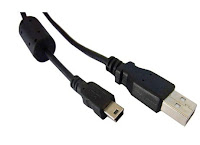 When it came to editing the footage we needed a way of getting our work onto the mac computers. Thankfully the school provided us with media import cables, they helped us out alot however they weren't without fault. At the time the macs we were using, had been updated to a new operating system, called mountain lion. Unfortunately this operating systems was having problems communicating with the macs which meant that some data transferal processes took longer to achieve and therefore ate into our groups editing time.
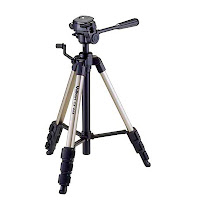
Item 3: Tripod
This three legged life saver really made filming steady shots a dream. When we initially went out to film our location scouting video, we found that alot of our shots were rocking and were not still. However, after some deliberation over what the cause of this may have been we deduced that it was the fact that the tripods had not been fastened on properly. Thankfully this problem was fixed and the shots are looking much better now.

Item 4: Apple Mac
This was the epicenter of all our groups work. Everything we created from digipack to video was made on here. With its intuitive editing software (Final Cut) to the Firefox application, these computers made putting together our media product quick and easy to do.
Item 5: Studio Lights
In order to control the lighting in the performance part of our video we felt it appropriate to utilize the schools lighting rig. They have two big spotlights each with adjustable stands. We hop these lights will help add an element of polish to our music video and make it look more professional.
Item 6: The software
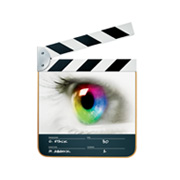 Although they are not actually physical items, I believe that the software we are currently using to create this video is very important, the most prominent pieces of editing and formatting software we have used would be the video editing program, Final Cut Pro. Final Cut allows me to take my footage and cut it together easily and intuitively allowing me to create a professional and polished piece with little difficulty. The second useful application is of course Firefox (I will go into this in further detail in a future post) the internet or more specifically Firefox has allowed me the opportunity to not only write these blog posts but also research and develop my understanding of the music industry and the conventions of the Hip Hop music genre through such sites as YouTube.
I have listed and spoke about each item below:

The most important part of our filming stage was of course the video camera. It allows us to capture our shots in high definition digital quality. The ease of access and usability of the cameras made them a pleasure to film with, plus they never ran out due to the use of a battery charger which was a life saver when it came to filming the next day. Transferring footage was also made much easier, thanks to the use a media import cable.
Item 2: Import cable (Mini USB)
 When it came to editing the footage we needed a way of getting our work onto the mac computers. Thankfully the school provided us with media import cables, they helped us out alot however they weren't without fault. At the time the macs we were using, had been updated to a new operating system, called mountain lion. Unfortunately this operating systems was having problems communicating with the macs which meant that some data transferal processes took longer to achieve and therefore ate into our groups editing time.
Item 3: Tripod
This three legged life saver really made filming steady shots a dream. When we initially went out to film our location scouting video, we found that alot of our shots were rocking and were not still. However, after some deliberation over what the cause of this may have been we deduced that it was the fact that the tripods had not been fastened on properly. Thankfully this problem was fixed and the shots are looking much better now.

Item 4: Apple Mac
This was the epicenter of all our groups work. Everything we created from digipack to video was made on here. With its intuitive editing software (Final Cut) to the Firefox application, these computers made putting together our media product quick and easy to do.
Item 5: Studio Lights
In order to control the lighting in the performance part of our video we felt it appropriate to utilize the schools lighting rig. They have two big spotlights each with adjustable stands. We hop these lights will help add an element of polish to our music video and make it look more professional.
Item 6: The software
Although they are not actually physical items, I believe that the software we are currently using to create this video is very important, the most prominent pieces of editing and formatting software we have used would be the video editing program, Final Cut Pro. Final Cut allows me to take my footage and cut it together easily and intuitively allowing me to create a professional and polished piece with little difficulty. The second useful application is of course Firefox (I will go into this in further detail in a future post) the internet or more specifically Firefox has allowed me the opportunity to not only write these blog posts but also research and develop my understanding of the music industry and the conventions of the Hip Hop music genre through such sites as YouTube.
Subscribe to:
Posts (Atom)