Here you can see us assembling the footage into the necessary places using Final cut.
In order to allow each of our group to bring their own ideas
to polishing of the video, we made sure to alternate the
responsibilities of each of us as an individual.
One of us would be putting together the footage in sequential order and cutting it to fit. The other two of us were thinking over possible effects to add to the video and also possible designs and shots to use for our Digipack.
Showing posts with label Behind the Video(Production). Show all posts
Tuesday, 27 November 2012
Wednesday, 21 November 2012
Behind the Video: Shooting the Video
After much planning on where and when we would be filming we finally managed to put it into action and get some really decent shots below are a few images of where we shot our video and what equipment we used:
We brought the platforms at the bottom of the photo (Black Boxes) out to create a extended stage for our artists to perform on and make their performance more dynamic.
Here
are three of the various location that feature in our video. These
are shots taken before we had edited together all of our footage. The
Drama Studio was perfect for our studio scenes as we could just get the
right level of low key lighting and they also had a tuning desk which
added to the music video a great deal. The problem we faced during the
filming of this scene were the fact that you could see straight into the
drama studio through a little glass window just off to the left of this
shot meaning we had to use more close up and high angle shots than we would have liked.
These are all Images sourced from either my group members phone or the actual video itself and are all relevant to the music video.
Sunday, 18 November 2012
Behind the Video: Equipment Used
In order to complete our video we needed to utilize the schools media equipment.
I have listed and spoke about each item below:
Item 1: Camera
The most important part of our filming stage was of course the video camera. It allows us to capture our shots in high definition digital quality. The ease of access and usability of the cameras made them a pleasure to film with, plus they never ran out due to the use of a battery charger which was a life saver when it came to filming the next day. Transferring footage was also made much easier, thanks to the use a media import cable.
Item 2: Import cable (Mini USB)
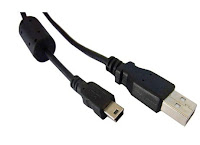
When it came to editing the footage we needed a way of getting our work onto the mac computers. Thankfully the school provided us with media import cables, they helped us out alot however they weren't without fault. At the time the macs we were using, had been updated to a new operating system, called mountain lion. Unfortunately this operating systems was having problems communicating with the macs which meant that some data transferal processes took longer to achieve and therefore ate into our groups editing time.
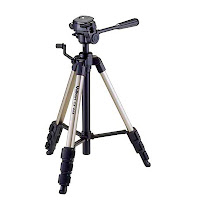
Item 3: Tripod
This three legged life saver really made filming steady shots a dream. When we initially went out to film our location scouting video, we found that alot of our shots were rocking and were not still. However, after some deliberation over what the cause of this may have been we deduced that it was the fact that the tripods had not been fastened on properly. Thankfully this problem was fixed and the shots are looking much better now.

Item 4: Apple Mac
This was the epicenter of all our groups work. Everything we created from digipack to video was made on here. With its intuitive editing software (Final Cut) to the Firefox application, these computers made putting together our media product quick and easy to do.
Item 5: Studio Lights
In order to control the lighting in the performance part of our video we felt it appropriate to utilize the schools lighting rig. They have two big spotlights each with adjustable stands. We hop these lights will help add an element of polish to our music video and make it look more professional.
Item 6: The software
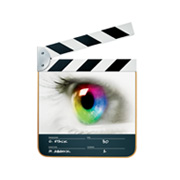
Although they are not actually physical items, I believe that the software we are currently using to create this video is very important, the most prominent pieces of editing and formatting software we have used would be the video editing program, Final Cut Pro. Final Cut allows me to take my footage and cut it together easily and intuitively allowing me to create a professional and polished piece with little difficulty. The second useful application is of course Firefox (I will go into this in further detail in a future post) the internet or more specifically Firefox has allowed me the opportunity to not only write these blog posts but also research and develop my understanding of the music industry and the conventions of the Hip Hop music genre through such sites as YouTube.
I have listed and spoke about each item below:
Item 1: Camera
The most important part of our filming stage was of course the video camera. It allows us to capture our shots in high definition digital quality. The ease of access and usability of the cameras made them a pleasure to film with, plus they never ran out due to the use of a battery charger which was a life saver when it came to filming the next day. Transferring footage was also made much easier, thanks to the use a media import cable.
Item 2: Import cable (Mini USB)
When it came to editing the footage we needed a way of getting our work onto the mac computers. Thankfully the school provided us with media import cables, they helped us out alot however they weren't without fault. At the time the macs we were using, had been updated to a new operating system, called mountain lion. Unfortunately this operating systems was having problems communicating with the macs which meant that some data transferal processes took longer to achieve and therefore ate into our groups editing time.
Item 3: Tripod
This three legged life saver really made filming steady shots a dream. When we initially went out to film our location scouting video, we found that alot of our shots were rocking and were not still. However, after some deliberation over what the cause of this may have been we deduced that it was the fact that the tripods had not been fastened on properly. Thankfully this problem was fixed and the shots are looking much better now.

Item 4: Apple Mac
This was the epicenter of all our groups work. Everything we created from digipack to video was made on here. With its intuitive editing software (Final Cut) to the Firefox application, these computers made putting together our media product quick and easy to do.
Item 5: Studio Lights
In order to control the lighting in the performance part of our video we felt it appropriate to utilize the schools lighting rig. They have two big spotlights each with adjustable stands. We hop these lights will help add an element of polish to our music video and make it look more professional.
Item 6: The software
Although they are not actually physical items, I believe that the software we are currently using to create this video is very important, the most prominent pieces of editing and formatting software we have used would be the video editing program, Final Cut Pro. Final Cut allows me to take my footage and cut it together easily and intuitively allowing me to create a professional and polished piece with little difficulty. The second useful application is of course Firefox (I will go into this in further detail in a future post) the internet or more specifically Firefox has allowed me the opportunity to not only write these blog posts but also research and develop my understanding of the music industry and the conventions of the Hip Hop music genre through such sites as YouTube.Tuesday, 30 October 2012
Behind the Video: Location Scoutting
Location of our performance
Our group decided that for the performance portion part of the video it would be good to get a simple white back drop with the to artists standing in-front of it. Our first and best choice was the school hall. We used the projector screen as the white back drop and used spotlights to increase the quality of the image.
Location of our narrative
Our group decided that for the performance portion part of the video it would be good to get a simple white back drop with the to artists standing in-front of it. Our first and best choice was the school hall. We used the projector screen as the white back drop and used spotlights to increase the quality of the image.
Location of our narrative
Tuesday, 31 July 2012
Behind the Video: Finished Preliminary Video Evaluation
We have completed our first music video recreation task. We decided to do the Eminem video Lose Yourself, it turned out this was a rather decent choice as although there were a lot of shots we were able to film them without having to worry about prolonged movement of the camera which can sometimes be the trickiest part of trying to replicate any piece of film. As you try to move a camera the image can become shaky or blurred meaning the overall quality is compromised.
Wednesday, 11 July 2012
Behind the Video: Filming the Preliminary
Day 2
During the following the days of filming we had to gather some outdoor scenes. Unfortunately, it was raining therefore making the filming difficult at times as the lens would become submerged in rain water. We tried to work round this problem by covering the camera with a raincoat we found lying around the school, although it help we could not defend against the rain coming directly at us.
Tuesday, 10 July 2012
Subscribe to:
Posts (Atom)


